

How Google Ads Actually Works: The Auction, the Costs, and What Most Guides Leave Out
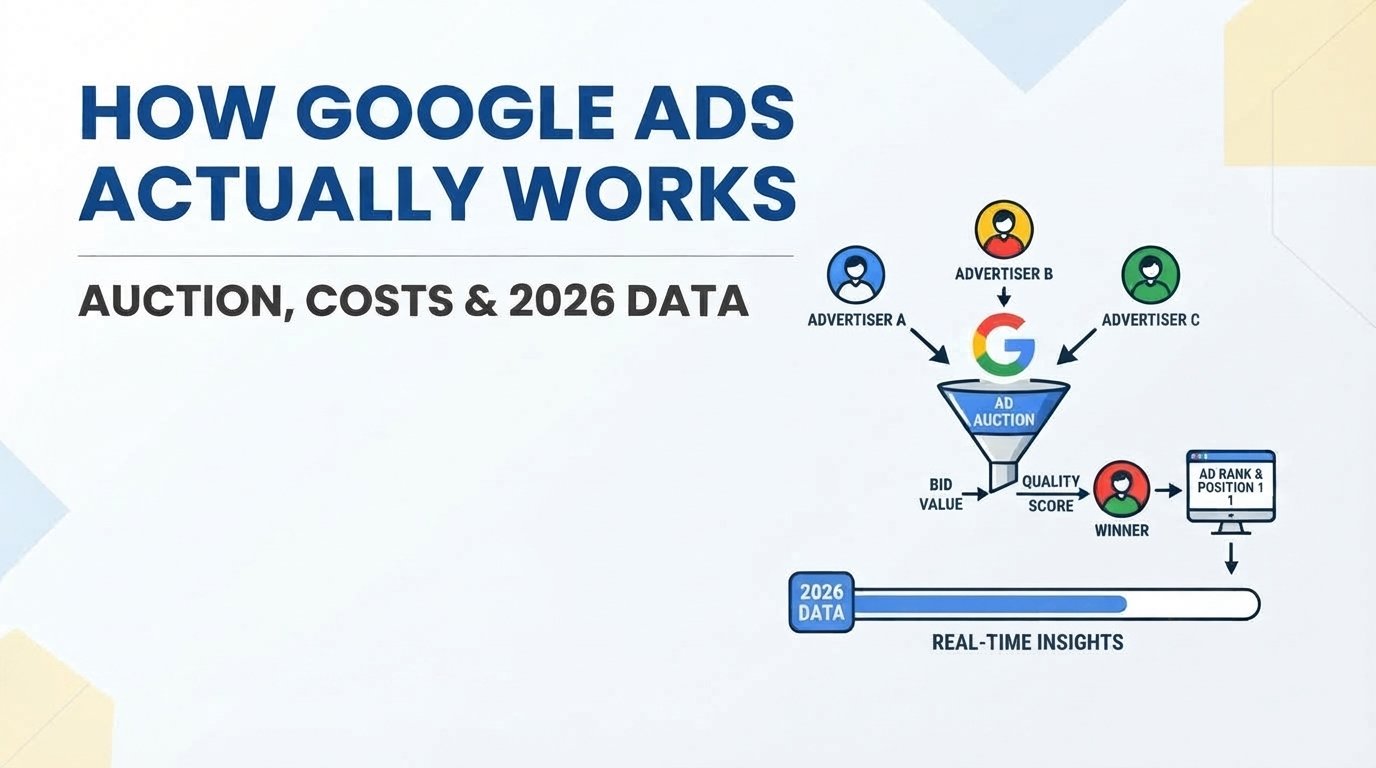
Every time someone types a search into Google, a real-time auction runs in under three seconds — and your ad’s position depends more on your landing page quality than your budget size. Google Ads is a pay-per-click advertising platform where you bid on keywords, but the actual cost you pay is determined by a second-price auction formula that most beginner guides never explain. If you’ve been reading generic “What is Google Ads” articles and still feel confused about where your money actually goes, this teardown is the one that fixes that.
The 3-Second Auction That Decides Whether Your Ad Shows
Here’s what happens in the time it takes you to blink.
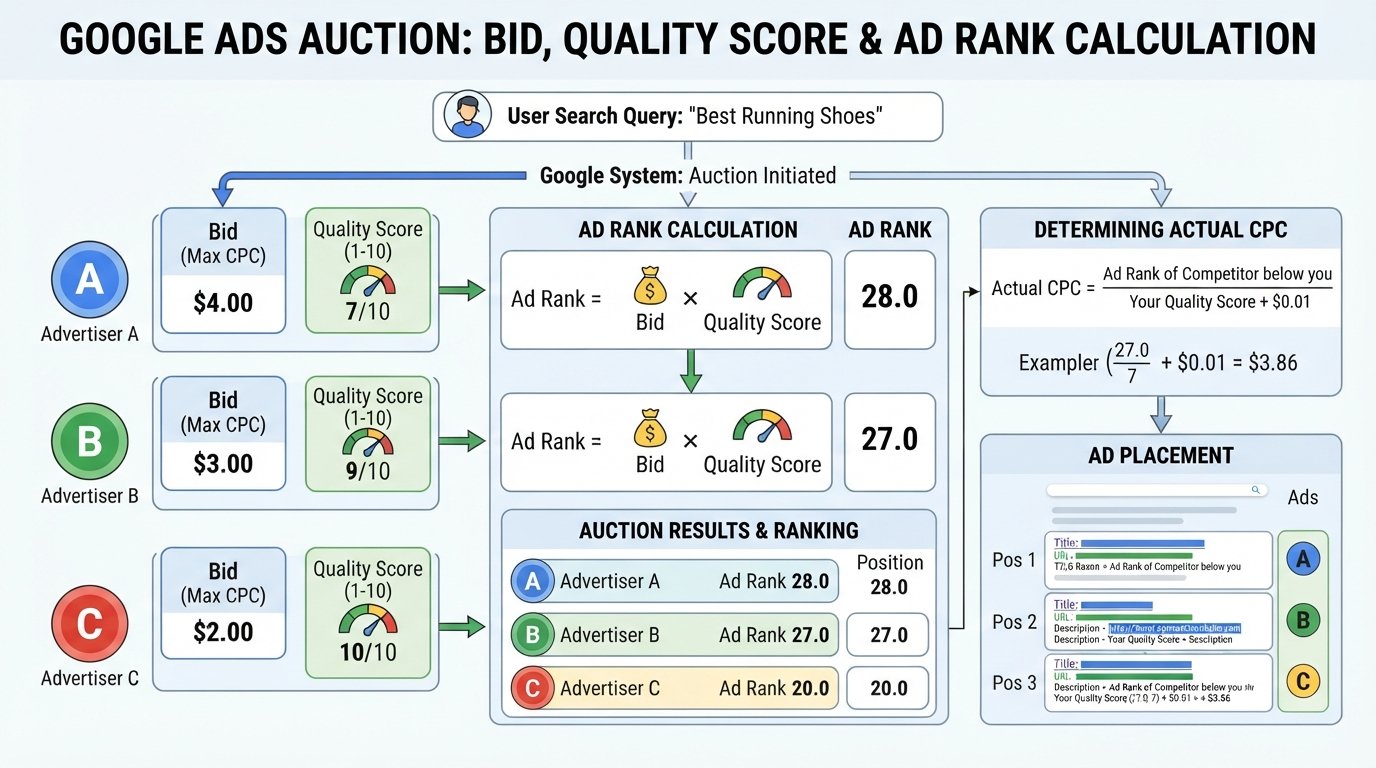
A user types “emergency plumber near me” into Google. Instantly, every advertiser who bid on that keyword enters a micro-auction. Google doesn’t just hand the top spot to whoever pays the most. It calculates an Ad Rank for each competitor using this formula:
Ad Rank = Maximum Bid × Quality Score
Your maximum bid is the most you’ve told Google you’re willing to pay for a single click. Your Quality Score is a 1–10 rating Google assigns based on your ad relevance, expected click-through rate, and landing page experience.
So an advertiser bidding $4 with a Quality Score of 9 (Ad Rank 36) will outrank an advertiser bidding $10 with a Quality Score of 3 (Ad Rank 30). The bigger spender loses.
And here’s the part most guides skip: you don’t pay your full bid. Google uses a second-price auction model, meaning you pay the minimum amount needed to beat the advertiser directly below you — usually a few cents more than their Ad Rank divided by your Quality Score.
This single mechanic is why some businesses pay $1.40 per click while their competitors pay $9.20 for the exact same keyword.
How Much Does Google Ads Really Cost in 2026?
The honest answer to “how much does Google Ads cost” is that the average small business now spends between $1,500 and $12,000 per month, but that range is almost useless without context.
What actually matters is your cost-per-click, and that varies wildly by industry. Here are real 2026 benchmarks pulled from aggregated campaign data across major verticals:
| Industry | Average CPC (2026) | Average Monthly Spend | Typical Conversion Rate |
|---|---|---|---|
| Legal Services | $7–$14 | $6,000–$24,000 | 4.5–7% |
| Home Services (HVAC, Plumbing) | $5–$11 | $2,500–$10,000 | 5–9% |
| SaaS / B2B Tech | $4–$10 | $4,000–$18,000 | 2.5–5% |
| E-Commerce (Retail) | $0.75–$3.25 | $1,200–$6,000 | 1.5–3.5% |
| Healthcare / Dental | $4–$9 | $2,500–$12,000 | 3–6% |
| Real Estate | $3–$8 | $2,000–$9,000 | 2–4.5% |
| Insurance / Finance | $12–$55 | $8,000–$35,000 | 3–6% |
The real catch is this: Google Ads pricing isn’t a fixed subscription. You set a daily budget cap, and Google will never exceed it. A $35/day budget means roughly $1,050/month maximum. But if your CPC is $7 and your conversion rate is 3%, you’re paying $233 per lead — which may or may not be profitable depending on your customer lifetime value.
Year-over-year CPC inflation has accelerated since 2024, with competitive verticals like legal and insurance seeing 8–12% annual increases. The businesses that thrive in 2026 are the ones optimizing Quality Score rather than just raising bids.
Do the math before you launch, not after your first invoice.
Quality Score: The Hidden Multiplier That Cuts or Doubles Your Bill
If you remember one thing from this article, make it this: Quality Score is the single biggest lever you control in Google Ads.
Google rates every keyword in your account on a 1–10 scale based on three factors:
- Expected Click-Through Rate (CTR): How likely users are to click your ad when they see it. Google compares your historical CTR against the average for your ad position.
- Ad Relevance: How closely your ad copy matches the user’s search query. If someone searches “affordable CRM for startups” and your ad says “Enterprise Software Solutions,” your relevance tanks.
- Landing Page Experience: Does your landing page load fast, match the ad’s promise, and make it easy to take the next step? Google actually crawls your page to check — and in 2026, Core Web Vitals thresholds are stricter than ever.
Here’s the financial impact most advertisers don’t realize. A keyword with a Quality Score of 10 gets a 50% discount on cost-per-click compared to the baseline. A Quality Score of 3 pays a 40% surcharge. Same auction. Same keyword. Drastically different bills.
What to do right now: Log into your Google Ads account, navigate to Keywords, add the “Quality Score” column, and sort from lowest to highest. Any keyword below a 5 is actively costing you more than it should.
Google Ads vs. Facebook Ads: Where Your Budget Actually Goes Further
This is the question I get asked more than any other, and the answer depends entirely on what stage of the buying journey your customer is in.
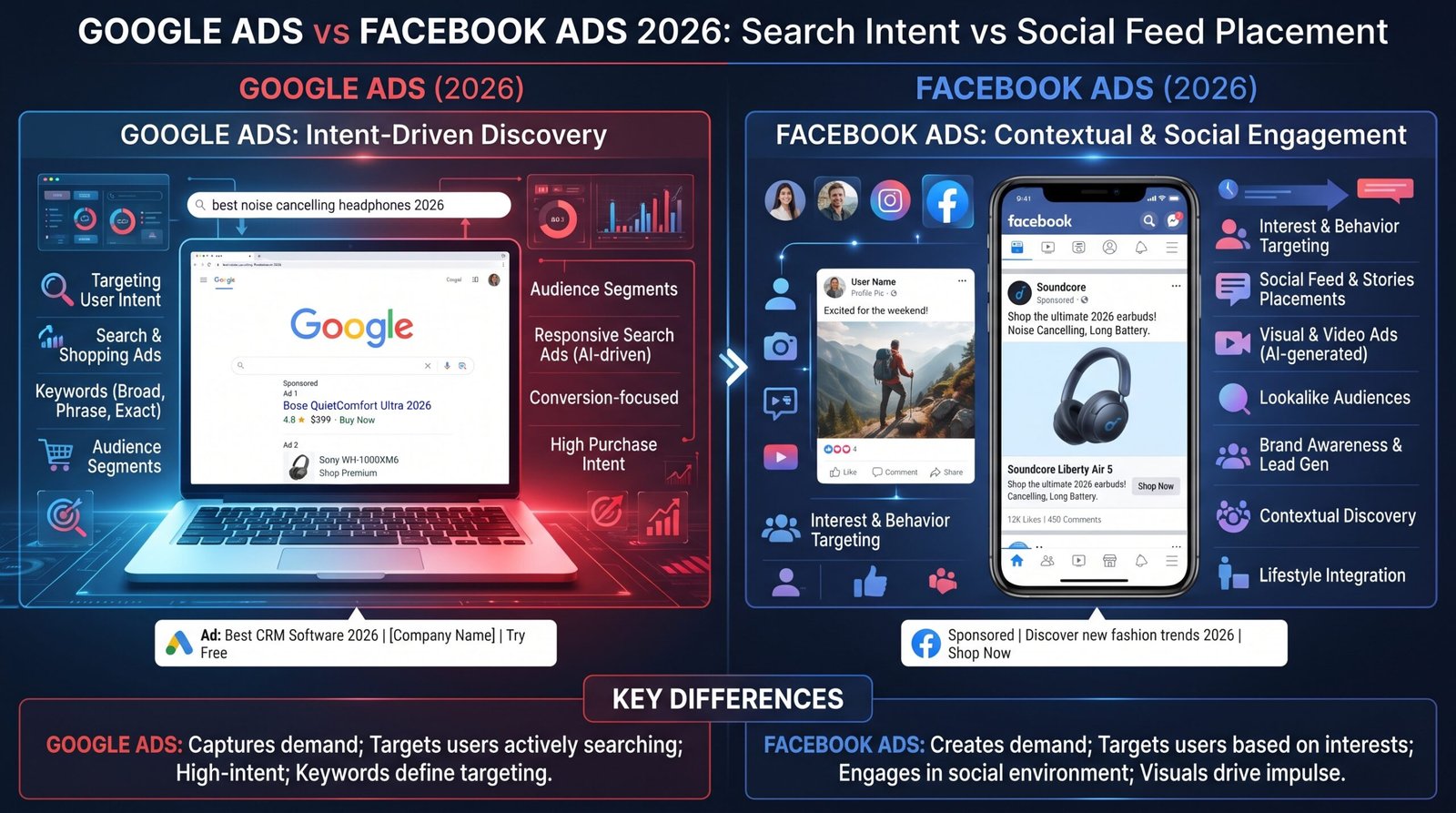
Google Ads captures demand. Someone types “best accounting software for freelancers” — they already know they have a problem and they’re actively looking for a solution. You show up at the exact moment of intent. Average conversion rates hover around 3.9% across industries in 2026.
Facebook and Meta Ads generate demand. Nobody logs into Instagram searching for accounting software. You’re interrupting their feed with an ad that has to create interest from scratch. Conversion rates average 1.8–2.8%, but your cost-per-click is typically 45–65% lower than Google Search.
| Factor | Google Ads (2026) | Meta / Facebook Ads (2026) |
|---|---|---|
| User Intent | High (active search) | Low (passive browsing) |
| Average CPC | $1.50–$55 (industry-dependent) | $0.60–$3.50 |
| Best For | Bottom-of-funnel conversions | Top-of-funnel awareness + retargeting |
| Learning Curve | Steeper (keyword strategy) | Moderate (audience targeting) |
| ROI Timeline | Faster (days to weeks) | Slower (weeks to months) |
| AI Automation | Performance Max, Smart Bidding | Advantage+ campaigns |
The smartest approach for most small businesses in 2026: Start with Google Search Ads to capture existing demand. Once you’re profitable, layer in Meta retargeting ads to re-engage visitors who clicked but didn’t convert. The cross-platform combination consistently outperforms single-channel spend.
The Campaign Structure Mistake That Burns 60% of Beginner Budgets
Most first-time advertisers dump 20–50 keywords into a single campaign with one generic ad. This is the fastest way to waste money on Google Ads, and here’s exactly why.
When you group unrelated keywords together, Google serves the same ad copy for all of them. Someone searching “cheap running shoes” sees the same ad as someone searching “marathon training footwear.” The ad can’t be specific to both, so it resonates with neither. Your CTR drops. Your Quality Score drops. Your cost-per-click climbs.
The fix takes about 20 minutes:
- Create separate ad groups by theme. “Running shoes for men,” “trail running shoes,” and “marathon shoes” each get their own ad group with 5–10 tightly related keywords.
- Write ad copy that mirrors each group’s keywords. If the ad group targets “trail running shoes,” those exact words should appear in your headline.
- Send each ad group to a specific landing page — not your homepage. A trail shoe searcher should land on a trail shoe category page.
This single restructuring typically improves Quality Scores by 2–4 points within the first billing cycle, which directly lowers your cost-per-click. In 2026’s higher-CPC environment, that Quality Score lift can save you $500–$1,500 per month on a mid-size account.
If you’re staring at a Google Ads dashboard right now wondering why your clicks aren’t turning into customers, ask yourself one question: do you have conversion tracking installed on your website? If the answer is no or “I’m not sure,” that’s your next fix — and it’s the topic of the section two scrolls down.
PPC Management Services: Agency vs. DIY Cost Breakdown
At some point, every advertiser hits the same wall: should I manage Google Ads myself or hire PPC management services?
The answer depends on your monthly ad spend and your tolerance for a learning curve that typically costs $2,500–$6,000 in wasted budget before you get proficient.
DIY makes sense if:
- Your monthly ad spend is under $3,500
- You have 5–10 hours per week to actively manage campaigns
- You’re comfortable learning conversion tracking, negative keywords, and bid adjustments
- Your industry CPC is under $6 (lower stakes per mistake)
Hiring an agency makes sense if:
- Your monthly ad spend exceeds $6,000
- Your cost-per-click is above $12 (every mistake is expensive)
- You need to scale quickly and can’t afford a 90-day learning period
- You’re in a competitive vertical like legal, insurance, or SaaS
Real 2026 pricing reality: Most reputable PPC agencies now charge either a flat monthly fee ($2,000–$6,000) or a percentage of ad spend (12–20%). If an agency quotes you less than $1,200/month for active campaign management, they’re likely using automated bidding with minimal human oversight — which you could do yourself for free through Google’s Smart Bidding tools.
The Conversion Tracking Gap That Wastes 40% of Ad Spend
Here’s a stat that should bother you: according to a 2025 analysis of small business Google Ads accounts, roughly 40% of ad spend still goes to campaigns with no functioning conversion tracking.
That means nearly half of all advertisers are paying for clicks with zero visibility into whether those clicks generated a sale, a phone call, or a form submission. They’re flying blind and calling it marketing.
Conversion tracking is a snippet of code (a “tag”) you place on your website’s thank-you or confirmation page. When a user clicks your ad and then completes a desired action — fills out a form, makes a purchase, calls your tracking number — the tag fires and reports that conversion back to Google Ads.
Without it, Google’s algorithm can’t optimize your bids. Smart Bidding strategies like Target CPA and Maximize Conversions literally require conversion data to function. You’re paying for a machine-learning engine and then refusing to give it fuel. In 2026, with Google’s enhanced conversions and consent mode requirements, the tracking setup is more complex but more critical than ever.
Your immediate action step: Go to Tools & Settings → Conversions in your Google Ads dashboard. If you see zero recorded conversions despite active spend, your tracking is broken. Fix it before you spend another dollar.
How to Lower CPC in Google Ads: 6 Levers Ranked by Impact
Google Ads Types: Which Formats Actually Convert (and Which to Skip)
Google offers more than a dozen ad formats, but only three consistently deliver ROI for small businesses in 2026:
- Search Ads (Text): The bread and butter. Your ad appears above organic results when someone searches your target keyword. Highest intent, highest conversion rates. Start here.
- Shopping Ads (Product Listing): Essential for e-commerce. Shows your product image, price, and store name directly in search results. Now accounts for roughly 80% of retail search ad spend as Google continues to prioritize visual product results.
- Performance Max (PMax): Google’s AI-driven format that distributes your ads across Search, Display, YouTube, Gmail, and Maps simultaneously. Powerful but requires at least $2,000/month and 30+ conversions per month to train the algorithm properly. In 2026, PMax has absorbed most legacy campaign types, making it nearly unavoidable for scaling accounts.
Formats to skip as a beginner: Standalone Display Network ads (low intent, high waste) and App campaigns (unless your product is a mobile app). Demand Gen campaigns can work for mid-funnel nurturing but require an established audience base first.
Frequently Asked Questions About Google Ads
How long does it take for Google Ads to start working?
Most campaigns generate clicks within 24–48 hours of launch, but meaningful conversion data takes 2–4 weeks to accumulate. Google’s Smart Bidding algorithms need at least 30 conversions in a 30-day period to optimize effectively. Expect your first month to be a learning investment, not a profit engine.
What is a good click-through rate for Google Ads?
The average CTR across all industries in 2026 is approximately 3.4% for Search ads. A “good” CTR is anything above 5.5%. If your CTR is below 2%, your ad copy likely doesn’t match the searcher’s intent, or you’re bidding on keywords that are too broad.
Can I run Google Ads with a small budget?
Yes. Google Ads has no minimum spend requirement. You can start with $10/day. The constraint isn’t budget size — it’s whether your cost-per-acquisition fits within your profit margins at that volume. A $350/month budget works fine for a local service business with $3.50 CPCs and a $600 customer lifetime value.
Is Google Ads worth it for small business?
Google Ads delivers a measurable 2:1 average ROI for small businesses that target high-intent keywords and track conversions properly. The caveat: businesses that skip conversion tracking or bid on broad-match keywords without negative keyword lists often see negative returns in their first 90 days. The platform rewards precision, not spend volume.
Your First 30 Days: A No-BS Google Ads Launch Checklist
Stop reading guides and start executing. Here’s your launch sequence:
- Days 1–3: Set up conversion tracking before you spend a single dollar. Install the Google Ads tag and enhanced conversions on your thank-you pages. Verify it fires correctly using Google Tag Assistant.
- Days 4–7: Build 3–5 tightly themed ad groups with 5–10 exact-match and phrase-match keywords each. No broad match yet.
- Days 8–10: Write 2–3 responsive search ads per ad group. Pin your strongest headline to position 1. Include a specific number or offer in every description.
- Days 11–14: Launch with a conservative daily budget (20–30% of your target spend). Let the auction gather data.
- Days 15–21: Check your Search Terms report. Add irrelevant queries as negative keywords. This single step typically eliminates 15–25% of wasted spend.
- Days 22–30: Evaluate conversion data. Kill keywords with high spend and zero conversions. Increase bids on keywords with a cost-per-acquisition below your target.
If you’ve made it this far, you already understand more about the Google Ads auction than most people who’ve been running campaigns for years. The difference between burning budget and building a profit engine isn’t a bigger ad spend — it’s understanding the mechanics you just read about.
So here’s the real question: are you going to launch your next campaign with this knowledge, or keep paying the “ignorance tax” that inflates every click you buy?
Bookmark this page. Share it with someone on your team who manages your ad spend. And if you want a deeper breakdown of how to structure your first profitable campaign from scratch, read our full Google Ads launch playbook.
