

How Much Should I Spend on Google Ads Per Month? The 4-Step Budget Formula I Use With Every Client
For most small businesses, the right Google Ads monthly spend is $1,500–$3,000 per month — enough to clear the algorithmic learning phase within 60 days while generating 30–50 measurable conversions. The exact number for your business depends on three variables you can calculate in under five minutes: your industry’s average cost-per-click, your target cost-per-acquisition, and your website’s current conversion rate. I’ve used this same four-step formula with dozens of clients, and it eliminates the guesswork that causes most small businesses to either overspend blindly or underspend themselves into irrelevance.
The $1,500 Floor — Why Anything Less Quietly Burns Your Money
I audit a lot of Google Ads accounts. The most common pattern I see in failing campaigns isn’t bad keywords or terrible ad copy — it’s budgets that are too small to generate statistically meaningful data.
Here’s the math most “start with $10 a day” blog posts never show you. Google’s algorithm needs approximately 50 conversions within a 30-day window to exit the learning phase and start optimizing your bids effectively. At a $3 average CPC and a 5% landing page conversion rate, you need roughly 1,000 clicks per month to hit that threshold. That’s $3,000 in ad spend before the system starts working efficiently.
Drop below $1,500 per month and you’re essentially paying Google to collect incomplete data. Your campaigns stay stuck in the learning phase indefinitely, your cost-per-acquisition stays artificially high, and you quit after 60 days convinced that “Google Ads doesn’t work for my industry.”
The $1,500 floor isn’t arbitrary. It’s the minimum viable budget that gives the algorithm enough signal to distinguish between converting and non-converting search queries in most local and service-based markets. E-commerce businesses with sub-$2 CPCs can sometimes get away with $800–$1,000. Legal and insurance firms competing at $15+ CPCs need $5,000 minimum.
Your number lives somewhere on that spectrum. Let’s calculate it.
How to Calculate Your Exact Google Ads Monthly Budget in 4 Steps
Forget generic industry averages. Here’s the reverse-engineering formula I walk every new client through during our first strategy call. You’ll need three numbers: your average customer lifetime value (LTV), your target cost-per-acquisition (CPA), and your industry’s average CPC.
Step 1: Find your industry’s average CPC.
The cross-industry average is $2.69 on the Search Network, but that number is nearly meaningless for your budget. A personal injury lawyer in Miami pays $50+ per click. A niche e-commerce store selling handmade candles pays $0.80. Check WordStream’s latest industry benchmarks for your specific vertical, or run a quick forecast in Google’s Keyword Planner with your top 5 target keywords.
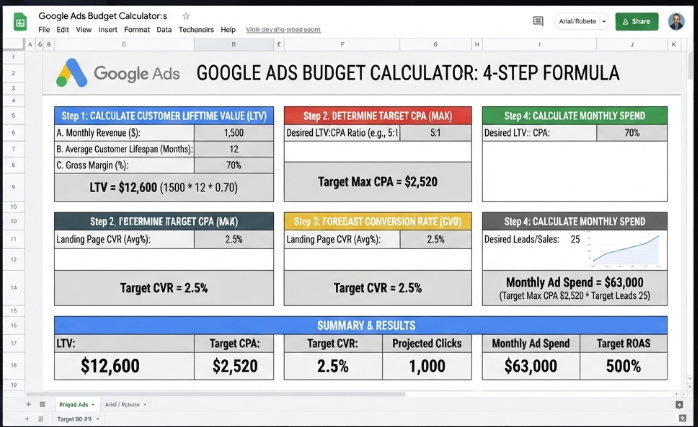
Step 2: Set your target CPA at 30% of customer LTV.
If your average customer is worth $2,000 over their lifetime, your maximum CPA should be $600. This gives you a healthy 70% gross margin after acquisition costs. Businesses that set CPA targets above 40% of LTV rarely sustain profitable campaigns past month six.
Step 3: Calculate your required monthly conversions.
Divide your target monthly revenue goal by your customer LTV. If you want $20,000 in new revenue and your LTV is $2,000, you need 10 new customers per month. Simple division, but most small business owners skip this step and just pick a budget that “feels right.”
Step 4: Multiply conversions by target CPA to get your budget.
10 customers × $600 CPA = $6,000 monthly budget. That’s your number. Not a guess, not a round figure pulled from a blog post — a budget derived from your actual business economics.
Monthly Budget Tiers by Business Stage (Startup → Scaling)
Your Google Ads budget shouldn’t be static. It should evolve with your business stage, your data maturity, and your cash flow reality. Here’s the tier system I use when advising clients on their PPC budget for small business growth phases.
Tier 1: Validation Phase — $1,000–$1,500/month (Months 1–3)
You’re testing whether paid search can acquire customers profitably in your market. Focus on 5–10 exact-match, high-intent keywords in your service area. Expect a higher CPA during this phase — you’re buying data, not just leads. The goal is to confirm that your landing page converts and your target keywords generate qualified traffic.
Tier 2: Optimization Phase — $2,000–$4,000/month (Months 3–6)
You’ve confirmed the channel works. Now you’re scaling what converts and killing what doesn’t. Expand to 20–30 keywords, add negative keyword lists, and start testing responsive search ad variations. Your CPA should drop 20–40% compared to Tier 1 as the algorithm exits the learning phase.
Tier 3: Scaling Phase — $5,000–$10,000+/month (Months 6–12)
You have proven unit economics and a predictable cost-per-acquisition. This is where you increase budgets aggressively on winning campaigns, layer in remarketing audiences, and potentially expand to Display or YouTube for brand awareness. Some clients at this stage explore small business financing options to accelerate ad spend during peak seasons — a move that makes sense only if your CPA is already profitable and your cash conversion cycle is under 30 days.
The critical rule: never jump from Tier 1 to Tier 3. I’ve watched businesses triple their budget overnight after one good week, only to watch their CPA spike 200% because the algorithm couldn’t handle the sudden volume shift. Scale in 20–30% increments every two weeks.
What a $2,000/Month Google Ads Budget Actually Buys You
Let me walk you through a real client example so you can see what a mid-range budget looks like in practice.
A local HVAC company came to me spending $800/month on a broad-match campaign targeting “air conditioning” across their entire state. They were getting clicks from DIYers looking for YouTube tutorials and homeowners 200 miles outside their service area. Their cost-per-lead was $185, and they’d closed exactly two jobs from six months of ad spend.
We rebuilt the account from scratch at $2,000/month. Here’s the breakdown:
- $1,200/month on exact-match emergency keywords: “emergency AC repair [city],” “furnace not working [city],” “HVAC same day [city].” Average CPC: $8.50. Monthly clicks: ~140.
- $500/month on seasonal maintenance keywords: “AC tune-up [city],” “furnace inspection near me.” Average CPC: $4.20. Monthly clicks: ~120.
- $300/month on branded search and competitor conquesting. Average CPC: $2.10. Monthly clicks: ~140.
Results after 90 days: Cost-per-lead dropped from $185 to $62. Monthly leads increased from 4 to 32. Closed jobs from paid search went from 2 in six months to 11 per month. Their average job value was $1,800, making the $2,000 ad spend a 10x return.
The budget didn’t change the market. The targeting did. But the budget was high enough to give us the data we needed to find those winning keywords in the first place.
Google Ads Budget vs. SEO vs. Social — Where Should Your Dollars Go First?
This is the question I get on almost every discovery call. The honest answer depends on your timeline, but here’s the allocation framework I recommend for most small businesses with a total digital marketing budget under $5,000/month.
If you need leads this month: Put 70% into Google Search Ads targeting high-intent commercial keywords. Put 20% into retargeting website visitors on Facebook or Instagram. Put 10% into local SEO fundamentals (Google Business Profile optimization, citation building, review generation).
If you can wait 6–12 months for compounding returns: Flip the ratio. Put 50% into SEO content and link building, 30% into Google Ads for immediate pipeline, and 20% into social media retargeting. SEO’s effective cost-per-lead drops to $5–$15 after month 12, but you need to fund the content creation and technical work during the build phase.
The mistake most small businesses make: Splitting a $2,000 budget equally across four channels. That gives you $500 per channel — not enough to generate meaningful results in any of them. Pick one primary channel, fund it properly, and add secondary channels only after the first one is profitable.
is Google Ads worth it for your business
The “Budget Allocation Ladder” I Use With Every New Client
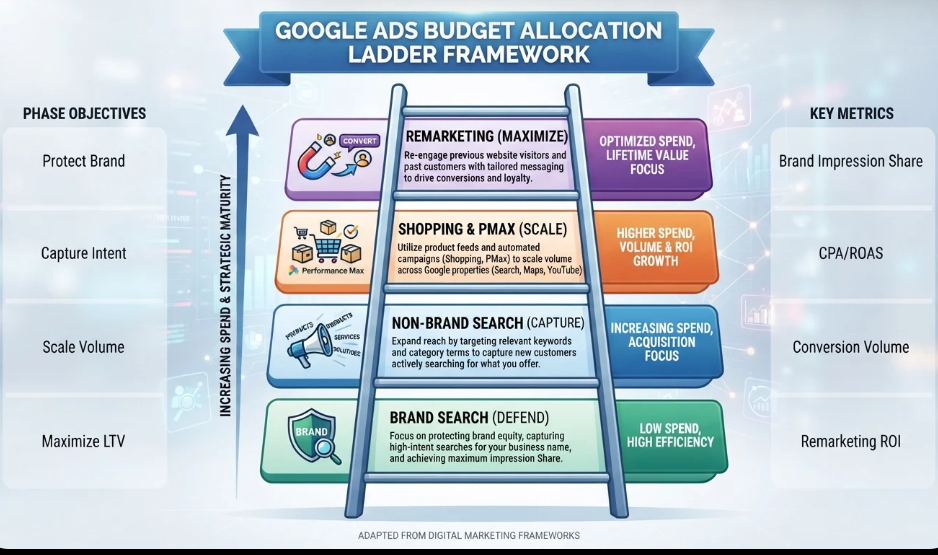
When a client hands me their approved monthly budget, I don’t dump it all into one campaign on day one. I use a phased allocation model I call the Budget Allocation Ladder. Here’s exactly how it works.
Rung 1 (Weeks 1–2): 40% of budget → Brand + Exact-Match Search.
Start with the safest, highest-intent keywords. Your brand name, your core service + city, and emergency/urgent queries. These convert at the highest rate and give you early wins that build confidence (and data).
Rung 2 (Weeks 3–4): 30% of budget → Broadened Search + Negative Keywords.
Expand to phrase-match variants and adjacent service keywords. Aggressively mine your search terms report for irrelevant queries and add them as negatives. This is where most of the budget waste happens in month one — you’re paying for clicks from people who will never buy.
Rung 3 (Weeks 5–8): 20% of budget → Remarketing + Display.
Now that you have website visitors from Rungs 1 and 2, layer in remarketing campaigns to recapture the 95% who didn’t convert on their first visit. Remarketing CPCs are typically 50–70% lower than Search, making this the most cost-efficient rung on the ladder.
Rung 4 (Weeks 9–12): 10% of budget → Testing + Experimentation.
Dedicate a small slice to testing new ad formats (Performance Max, YouTube, Demand Gen) or new keyword themes. Most of these tests will fail, and that’s fine — you’re looking for the one outlier that scales.
The key principle: never allocate budget to Rung 3 or 4 until Rungs 1 and 2 are profitable. I see businesses running Display campaigns before their Search campaigns are optimized, which is the equivalent of decorating a house that’s still on fire.
If you’ve just run the 4-step calculation above and your number came out higher than you expected, don’t panic. You don’t need to hit your target budget on day one. Start at Tier 1 ($1,500), prove the unit economics, and scale from there. The worst thing you can do is start at your full target budget with untested campaigns and unoptimized landing pages. Fix the foundation first, then pour fuel on the fire.
5 Budget Mistakes That Quietly Drain Your Account Every Month
After auditing hundreds of small business Google Ads accounts, these five mistakes show up in roughly 80% of them. Each one silently inflates your cost-per-acquisition by 20–50% without triggering any obvious warning signs in the dashboard.
Mistake 1: Running ads 24/7 when your business only converts during business hours.
A dental practice I audited was spending 35% of its budget between 10 PM and 6 AM. Those clicks converted at one-fifth the rate of daytime clicks. We added an ad schedule and immediately cut CPA by 28% without reducing total conversions.
Mistake 2: Using broad match keywords without a negative keyword strategy.
Broad match is Google’s default for a reason — it maximizes their revenue, not yours. A roofing client was paying $12 per click for searches like “how to fix a roof leak yourself” and “free roofing materials.” We switched to phrase match and added 200+ negative keywords in the first month.
Mistake 3: Ignoring how much to spend on Google Ads management vs. media.
If you’re paying an agency $1,500/month in management fees on top of $2,000 in ad spend, your real monthly cost is $3,500. Factor management fees, landing page tools ($99–$199/month for Unbounce or Instapage), and click fraud protection ($50–$100/month) into your total budget before you commit.
Mistake 4: Setting and forgetting your budget for months.
Your market changes every quarter. Competitors enter and exit auctions, seasonal demand shifts, and CPCs fluctuate. Review your budget allocation at least every 90 days and adjust based on actual performance data, not the number you picked in January.
Mistake 5: Spreading budget across too many campaigns.
A $2,000 monthly budget split across 8 campaigns gives each campaign $250 — not enough data for any of them to optimize. Consolidate into 2–3 tightly focused campaigns and let the algorithm do its job.
How Seasonality Should Change Your Monthly Google Ads Spend
Your Google Ads budget should breathe with your business cycle, not sit at a flat $2,000 every month regardless of demand. Here’s the seasonal adjustment model I use for most service-based small businesses.
Q1 (January–March): Increase budgets 15–25% if you’re in B2B services, consulting, or SaaS. New year budgets are fresh, decision-makers are actively evaluating vendors, and CPCs are typically 10–15% lower than Q4 due to reduced competition. For home services, Q1 is slower — reduce budgets 10–20% and focus on maintenance keywords.
Q2 (April–June): Peak season for home services, landscaping, and local contractors. Increase budgets 20–30% and bid aggressively on high-intent keywords. CPCs rise as competition intensifies, but conversion rates typically rise faster, keeping your CPA stable or improving.
Q3 (July–September): Transition period. Start building campaigns for Q4 demand if you’re in e-commerce or retail. For service businesses, maintain Q2 budgets but start testing new ad creatives and landing pages for the fall push.
Q4 (October–December): E-commerce and retail businesses should increase budgets 30–50% for the holiday shopping surge. B2B services typically see a slowdown as corporate budgets freeze — reduce spend 15–20% and focus on remarketing to warm leads who didn’t close in Q3.
The businesses that adjust budgets quarterly consistently outperform those that set a flat monthly number in January and never revisit it. Use Google’s Performance Planner tool to forecast seasonal demand shifts in your specific market.
Frequently Asked Questions About Google Ads Monthly Budgets
What is a good daily budget for Google Ads?
A good daily budget for Google Ads is $50–$100 per day for most small businesses, which translates to $1,500–$3,000 monthly. This range generates enough daily impressions and clicks to exit the algorithmic learning phase within 60 days. Anything below $30 per day typically starves campaigns of the conversion data they need to optimize effectively.
Is $500 enough for Google Ads?
$500 per month is enough for a 14-day test campaign in low-competition local markets, but it’s not enough to sustain profitable campaigns long-term. At a $3 average CPC, $500 buys roughly 166 clicks per month — not enough data for Google’s algorithm to optimize. Most industries require $1,500+ monthly to generate consistent, measurable results.
How much do Google Ads cost per click?
The average Google Ads cost per click across all industries is $2.69 on the Search Network and $0.63 on the Display Network. However, competitive industries like legal ($9.19 CPC), insurance ($7.50 CPC), and home services ($6.40 CPC) cost significantly more, while e-commerce and education average under $2 per click.
How much should I spend on my first Google Ads campaign?
For your first Google Ads campaign, budget $1,500–$2,500 over the first 60 days. This covers the algorithmic learning phase (roughly 50 conversions needed for full optimization) and gives you enough data to identify winning keywords and eliminate budget waste. Split this across 1–2 tightly targeted search campaigns rather than spreading thin across multiple ad groups.
Lock In Your Number and Start Testing
Your Google Ads budget isn’t a guess. It’s a calculation. Run the four-step formula from earlier in this article — find your CPC, set your CPA at 30% of LTV, calculate required conversions, and multiply. The number that comes out is your starting point, not your ceiling.
Start at Tier 1 ($1,500/month) if you’re new to paid search. Prove the unit economics over 90 days. Then scale in 20–30% increments as your CPA stabilizes and your landing page conversion rate improves. The businesses that win on Google Ads aren’t the ones with the biggest budgets — they’re the ones with the most disciplined allocation strategy.
If you’ve made it this far, you already have a more precise Google Ads budget than 90% of small business owners who are still Googling “how much should I spend” and settling for generic advice. So here’s the real question: have you actually calculated your customer lifetime value yet?
If yes, plug it into the four-step formula right now and lock in your number. If no, that’s your first task this week — before you spend a single dollar on ads. Bookmark this page, share it with your business partner or marketing lead, and read our complete small business marketing budget guide to see how Google Ads fits into your overall marketing allocation.
